
How it works
The proxy acts as an intermediary between the agent’s browser and the cloud. Which traffic goes through it is usually set by a desktop Proxy Auto-Configuration (PAC) file.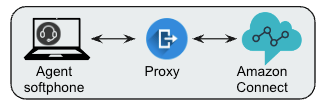
Symptoms
- Dropped calls, with no matching fault on the platform side.
- Softphone controls that don’t respond, so agents can’t answer and fall into a missed-call state.
- Clustered signaling and handshake errors across every agent behind the same proxy.
- Agents on one network affected while agents elsewhere are fine.
Prove it
Take a sample of affected agents and do one of these:- Put proxy bypass rules in place for the softphone’s media, signaling, and API traffic.
- Move them to a network that doesn’t apply the same proxy rules.
Platform specifics
Which endpoints must bypass the proxy depends on your platform.- Amazon Connect: proxy bypass rules — the four CCP (Contact Control Panel) endpoints, which of them must bypass, and the AWS networking constraints that go with them.
Related
- Softphone issues — reading the errors a proxy produces.
- Which URLs and protocols to allow — Operata’s own network requirements.
- RTC session failure and ICE timeout — when media can’t establish at all.