
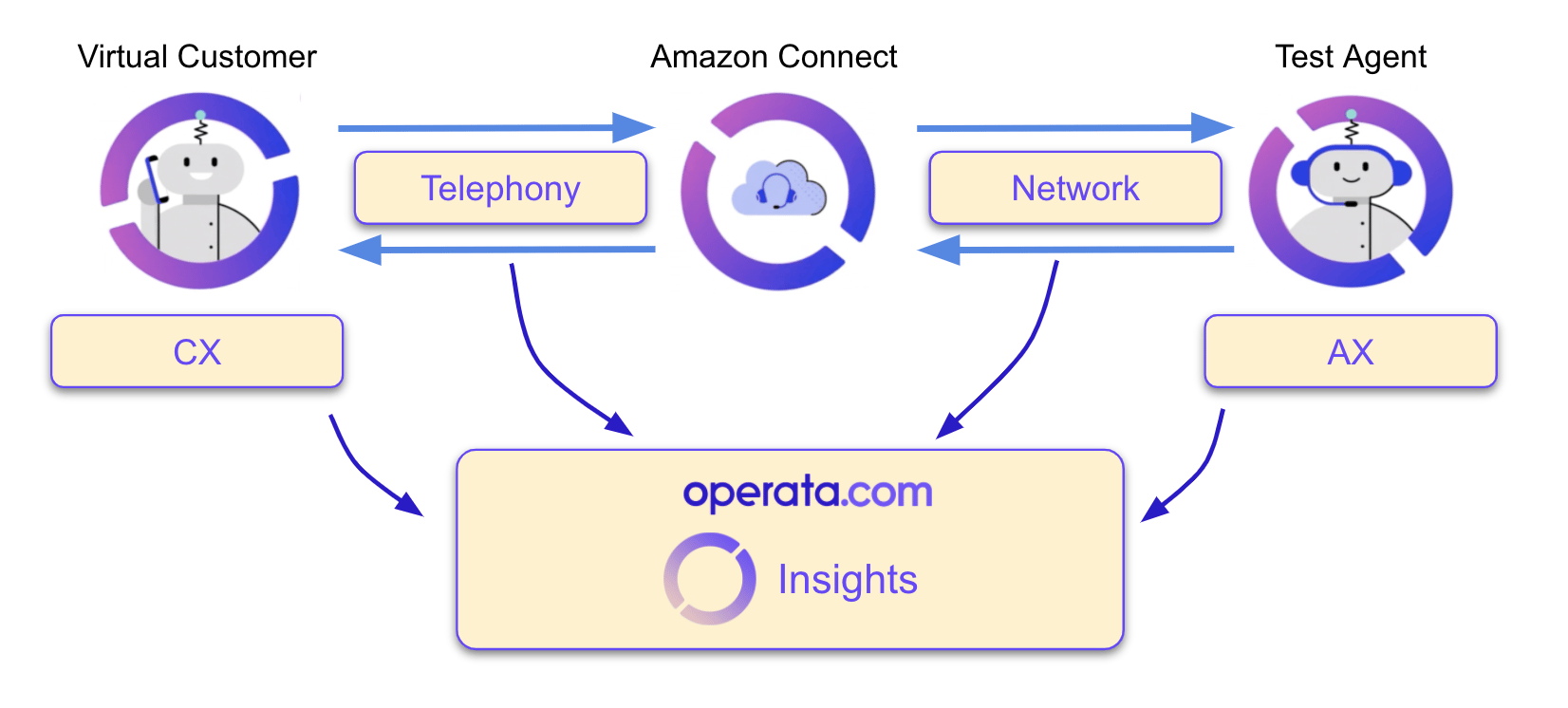
1. Test Run Details
A summary of the test and highlights of any issues found:- Agent Type: Human/Virtual.
- Start: The time the test run started, not necessarily the time the test happened.
- End: The time the test run ended.
- Date: The date of the test run (Date/Month/Year)
- Heartbeat Id: The Operata test identifier (not the Amazon Connect callContactID).
- Top Insights: Highlights of the issues detected during the test run.
2. Telephony
The results show the performance of the Telephone network used to connect the customer to Amazon Connect. [LHS] Details- Dialled Number: The number dialled for the test (could be a toll-free number)
- Answer Point DID: The Amazon Connect number the call was delivered to.
- Completed: The test call connected and the test completed
- Failed: The test call could not be made.
- Busy: The test call received busy tone.
- No Answer: The test call was not answered by the Contact Center.
- Call Disconnected Prematurely: The test call was answered, but disconnected before the test completed.
- Remove its an insight [High Ringing Time: The test call took longer to answer than expected (answer time)]
- Post Dial Delay: The time in ms (1,000 ms = 1 seconds) it took the test call to receive ringtone from Contact Center once it had completed dialling.
- Ringing Time [currently Answer Time]: The time in ms [seconds] it took from when the test call received ringtone to it being answered by the Contact Center.
3. Customer - Contact Center
words [LHS] Results- Customer to Contact Center - Audio Loss: The percentage drop in the quality of the audio received by Amazon Connect from the Virtual Customer.
- Customer to Contact Center - Score: The Operata Audio Quality score is the quality of the audio received by Amazon Connect from the Virtual Customer.
- Contact Center to Customer - Audio Loss: The percentage drop in the quality of the audio received by the Virtual Customer from Amazon Connect.
- Contact Center to Customer - Score: The Operata Audio Quality score is the quality of the audio received by the Virtual Customer from Amazon Connect.
- Customer - Contact Center RTT: The time in ms (1,000 ms = 1 seconds) it took audio to get from the Virtual Customer to Amazon Connect and back
- Audio RTT [Latency]: The time in ms for audio to get from the Virtual Customer to the Agent and back to the Virtual Customer.
4. Contact Center - Agent (Agent Username)
words [LHS] Results- Contact Centre to Agent - Audio Loss: The percentage drop in the quality of audio received by the test Agent from the Contact Center.
- Contact Centre to Agent - Score: The Operata Audio Quality score is the quality of the audio received by the test Agent from the Contact Center.
- Agent to Contact Centre - Audio Loss: The percentage drop in the quality of audio received by the Contact Center from the test Agent.
- Agent to Contact Centre - Score: The Operata Audio Quality score is the quality of the audio received by the Contact Center from the test Agent.
- Contact Center - Agent RTT: The time taken in ms for the test audio file sent from Connect to reach the test agent and get back to Connect.
- Audio RTT [Latency]: The time in ms for audio to get from the Virtual Customer to the Agent and back to the Virtual Customer.
- CPU Utilisation: The Average, Min and Max Percentage CPU utilisation of the test agents machine, during the test.
- Agent Username: The Amazon Connect Username used to login to the softphone
- CPU Type: Processor type on the test agent.
- Browser Type Version: Browser type and version of the test agent.
5. Network (XX/10)
The quality of the data network which is given an overall Operata Experience score out of 10. How the Operata Experience score is calculated [LHS] Results- Packet Loss: The Average, Min and Max percentage inbound packet loss
- Jitter: The Average, Min and Max inbound jitter in ms
- RTT: The Average, Min and Max Round Trip Time in ms
- MOS: The Average, Min and Max MOS (Mean Opinion Score)
- Agent LAN IP: The Agents LAN IP address (either local or assigned, by a VPN for example)
- Agent WAN IP: The Agents Internet WAN IP address (may not be the same as the voice media path)
- Network Type: The test agents network type.
- TURN server FQDN + Port: The Amazon TURN and Port used for the test call.